How to Deploy an AI Agent in 30 Days
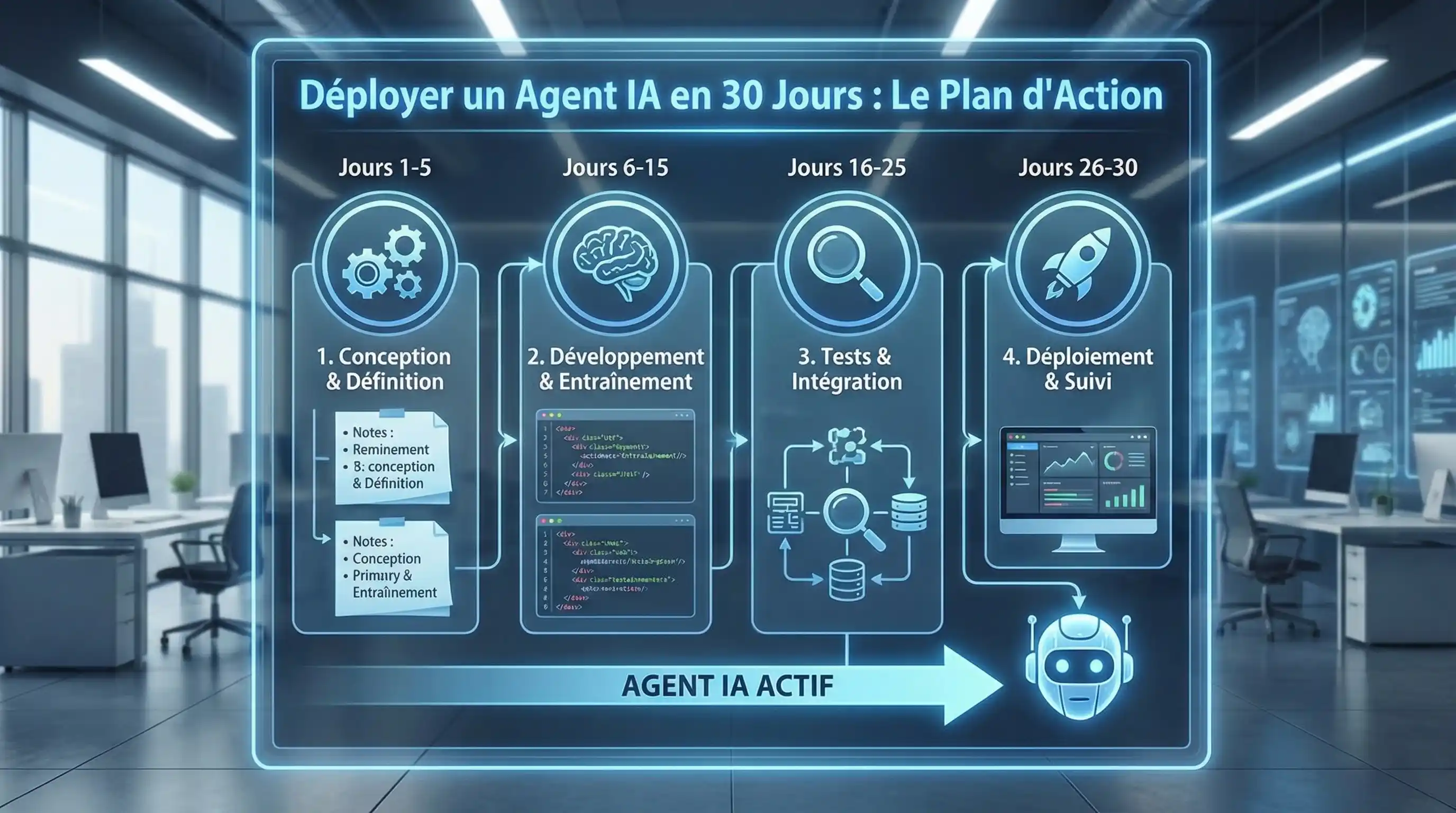
Table of contents
To deploy an AI agent in production in 30 days, follow this 4-phase roadmap: Week 1, identify a repetitive task and calculate its ROI. Week 2, choose the stack (n8n/Make + LLM + GDPR compliance). Week 3, build the workflow and refine the prompts. Week 4, test in shadow mode then go live. The fatal mistake: trying to automate everything at once instead of targeting a “Minimum Viable Agent.”
Most AI projects fail. Not because of the technology, but because they’re too ambitious, too vague, and too slow.
Forget “POCs” (Proof of Concept) that drag on for 6 months and end up in a drawer. Your mission, should you choose to accept it: Launch an operational AI Agent that delivers real value in 4 weeks flat.
That’s exactly the methodology we apply at Node6 to deliver agents to our clients. Clock’s ticking.
Week 1: The “Minimum Viable Agent” (MVA) Strategy
Goal: Don’t build a Swiss Army knife. Find THE task that hurts.
- Day 1-2: The Pain Audit. Talk to your team. Where are they wasting time? (Hint: look at solopreneur tasks or recruitment.)
- Day 3: The Choice. Select ONE task. It must be repetitive, based on digital data (text, numbers), and have a calculable ROI.
- Day 4-5: The Spec. Write on one page: “The agent must do X when Y happens.” No more complicated than that.
The mistake to avoid: Wanting an agent that handles “all of customer service.” Start with an agent that just does “password resets.” That’s the MVA principle - like an MVP, but for agents.
Week 2: The Tech Stack (The Garage)
Goal: Choose your weapons without breaking the bank.
- Day 6-7: Choosing the Orchestrator. n8n or Make? Read our comparison. If you have sensitive data, install n8n on a private server.
- Day 8-9: Choosing the Brain. GPT-4o (versatile), Claude Sonnet 4 (best for coding and reasoning) or Mistral Large (the sovereign choice). At Node6, we use the Claude API for its robustness and zero-training policy.
- Day 10: Security. Check your compliance with our GDPR & AI Act Checklist. Better safe than sorry.
Week 3: The Build (Hands Dirty)
Goal: Have something that works (even if it’s ugly).
- Day 11-13: The Workflow. Connect your building blocks. Trigger (Email received) > Action (AI Analysis) > Action (Response or CRM). It’s the same pattern as our agents Zoe (trigger LinkedIn > enrichment > message) and Magalie (trigger application > screening > scoring).
- Day 14: Prompt Engineering. This is where everything hinges. Spend an entire day refining the instructions given to the AI. Test 50 variations. Prompt quality = agent quality.
- Day 15: Guardrails. Prevent the AI from saying nonsense. Add strict filters and validation rules. This is non-negotiable, especially if your agent interacts with customers.
Week 4: Test, Deploy & Celebrate
Goal: Release the beast into the wild (under supervision).
- Day 16-20: Shadow Mode. The agent runs but sends nothing. It generates drafts. A human validates every action. This is the time to fine-tune and spot edge cases.
- Day 21-25: Limited Live. The agent handles 10% of real traffic (the simplest cases). You monitor logs daily.
- Day 26-29: Optimization. Analyze failures. Fix the prompt. Adjust guardrails.
- Day 30: GO LIVE. The agent is autonomous. You just reclaimed 20 hours per week.
What’s Next?
This first agent is just the beginning. Once you have the method, you can replicate it for LinkedIn Sales, accounting, or HR.
Automation is a gentle addiction. Once you’ve tried it, there’s no going back.
The Expert’s Advice If you don’t want to do all this alone, that’s exactly our job at Node6. We deliver ready-to-use AI agents, documented and maintained, like a SaaS product - not a prototype on a napkin. Book a free diagnostic to identify your first agent.
Frequently asked questions
How long does it take to deploy an AI agent?
Do you need to know how to code to create an AI agent?
What's the most common mistake when launching an AI agent?
Related articles
 AI Agents
How to Calculate the ROI of Your AI Agents
Think AI is expensive? Wrong. Learn how to precisely calculate your automation ROI and prove it pays for itself in 30 days.
 AI Agents
Chatbot or AI Agent, What's the Difference?
Still confusing chatbots with AI Agents? Big mistake. Discover why one is a gimmick and the other is a virtual employee that actually boosts your business.
 AI Agents
What Is an AI Agent? The Complete 2026 Guide
Forget basic chatbots. Discover what an AI Agent really is, how it's revolutionizing automation in 2026, and how to integrate one into your business.
Stay up to date on AI
One email per month with the best AI insights for your business.
Unsubscribe in one click. GDPR compliant.